NetFlags
All of proDuke's new features and modifications are toggled via NetFlags. These are a collection of options that can be toggled in-game through the menu or on start-up through command line arguments.
NetFlags #
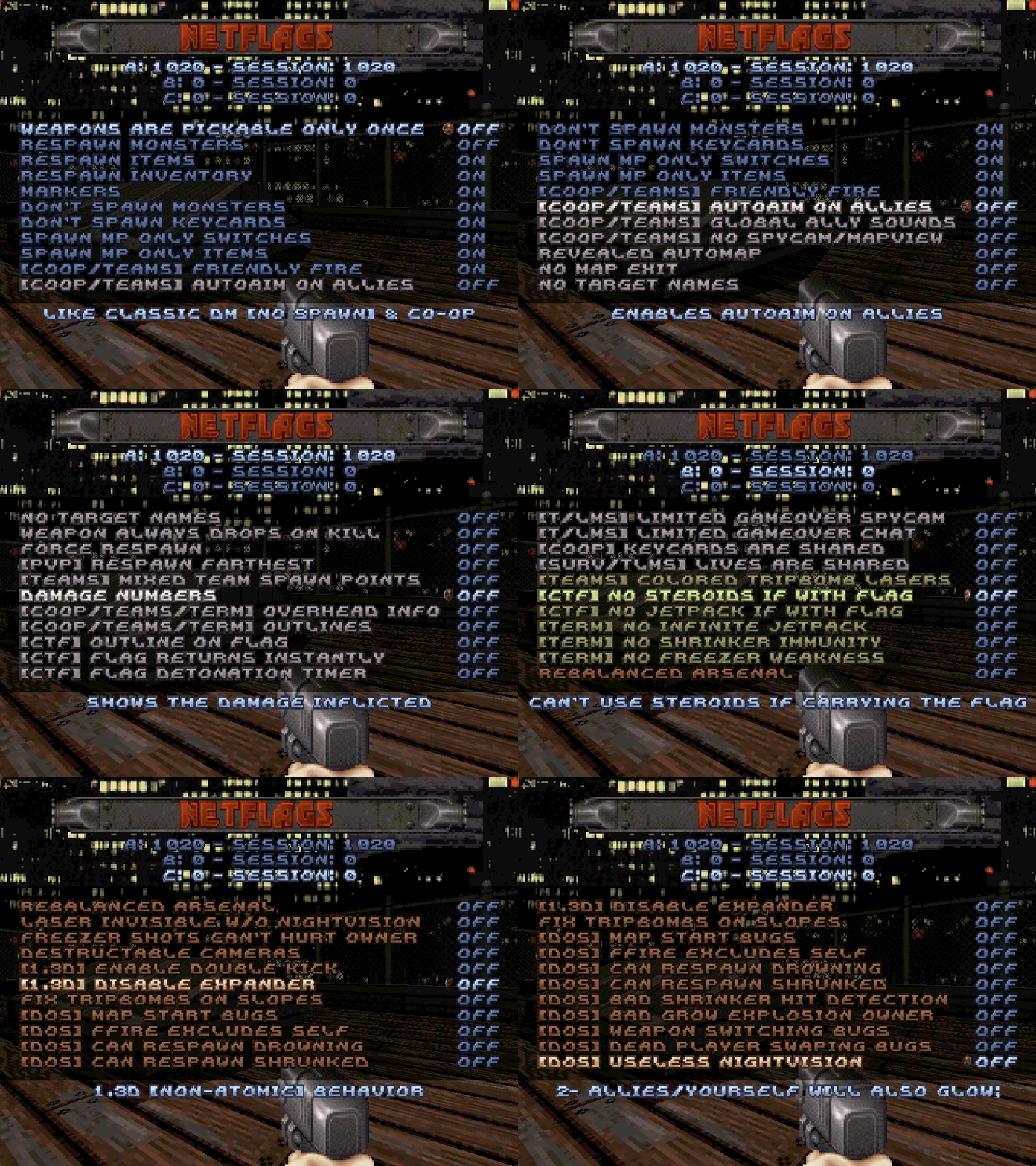
Now, under
Netplay Options, there is a new menu called
NetFlags. You can toggle on/off most of the new features through here. Also, some of the original game options (shown in blue) have been moved to here, like setting wheter the match will be "spawn" or "no spawn", coop friendly fire, starting with keycards or not, etc. The number shown above the menu is a bitfield representing all enabled flags, go to command line arguments to learn more. You can use the args builder to generate the argument.
| IN GAME NAME | DESCRIPTION |
|---|---|
| NETFLAGS A | |
| Weapons Pickable Once |
Originally a built-in behavior of COOP and DM(NO SPAWN). Makes it impossible to pick again a weapon that you already have. |
| Respawn Monsters |
Dead monsters will respawn after being dead for 30 in game seconds. Usually, but not necessarily, coupled with the Damn I'm Good skill. |
| Respawn Items | Items (health items, armor, weapons and ammo) will respawn in 30 seconds after being picked. |
| Respawn Inventory | Inventory items (Medkit, Steroids, Holoduke, Jetpack, Nightvision, Scuba Gear and Boots) will respawn in 30 seconds after being picked. |
| Markers | In case the netflags Respawn Items and/or Respawn Inventory netflag(s) is(are) enabled, a spinning icon will spawn on the map to display how long it will take for the item to respawn. |
| Don't Spawn Monsters | No monster will be spawned. Recommended for PVP modes. |
| Don't Spawn Keycards |
Originally a built-in behavior of DM(SPAWN) and DM(NO SPAWN). No keycard will be spawned on the map. Not to be confused with players spawning already having the keycards on PVP modes, that is now part of the Starting Inventory options. |
| Spawn DM Only Switches |
Originally a built-in behavior of DM(SPAWN) and DM(NO SPAWN). Makes it so DM only switches will spawn on the map. |
| Spawn MP Only Items |
Originally a built-in behavior of all online modes. Makes it so MP only items will spawn on the map. |
| [COOP/TEAMS] Friendly Fire |
If enabled, it will be possible to hurt allies (COOP/Survival as well as on team based modes). Originally, if disabled, this would also make it impossible to hurt yourself with your own weapons, but this was fixed in proDuke. This original behavior can be restored by enabling the NetFlagsC [DOS] FFire Excludes Self. |
| [COOP/TEAMS] Autoaim On Allies | The autoaim will also work on allies. |
| [COOP/TEAMS] Global Ally Sounds |
Originally a built-in behavior of COOP. Ally emitted sounds will be global (e.g. Duke Talk). |
| [COOP/TEAMS] Disable Spycam/Mapview | Disables the Spycam/Coop view in cooperative and team-based modes for all players. Will also not show allies on the map. |
| Revealed Automap | The automap will be fully revelead from start. |
| No Map Exit | Makes it so it's impossible to normally exit the map (e.g. hitting the nuke button). It's still possible to change maps through the menus. |
| No Target Names | Global toggle of Target Names (disables it from the match, regardless of individual player local settings'). |
| Weapon Always Drops On Kill | The player will always drop its weapon upon dying, instead of only doing it #% of the time (original behavior). |
| Force Respawn | Makes it so you'll respawn immediatelly upon dying. Highly recommended for the Last Man Standing (LMS) game mode. |
| [PVP] Respawn Farthest | Makes it so you'll always respawn on the farthest available respawn point relative to where you just died, instead of respawning at one random spawn point available. Has no effect on COOP and Survival modes. |
| [TEAMS] Mixed Team Spawn Points |
If the current game mode is a Team mode AND in case the map has team spawn points, these spawn points will be assigned regardless of which team each player is on. This option must stay disabled for the CTF modes to work properly. Its main use is to play TDM/TLMS on CTF maps (so spawns can happen anywhere) |
| Damage Numbers | Displays the inflicted damage on players and on monsters. |
| [COOP/TEAMS/TERM] Overhead Info | Allied players (or the Terminator itself and its targets, in case of the Terminator mode) will have an overhead text showing their name and current health. |
| [COOP/TEAMS/TERM] Outlines |
Allied players (or the Terminator itself and its targets, in case of the Terminator mode) will have an outline that can be seen through walls. Will also be seen through walls: (a)The overhead info, the player weapon and the typing/menu icon (if [COOP/TEAMS/TERM] Overhead Info is enabled); (b)The allied tripbombs (if [TEAMS] Colored Tripbombs is enabled); |
| [CTF] Outline On Flags | All CTF flags will have an outline (that can be seen through walls). |
| [CTF] Flag Returns Instantly | The CTF flag will return instantly upon being dropped, instead of requiring an allied player to touch it for it to be returned (or having to wait for the countdown to be depleted). |
| [CTF] Flag Auto Detonate |
Upon being captured, the CTF flag will have a countdown of 30 in game seconds for it to be delivered. It will auto detonate if not delivered in time, forcing it to be dropped by killing the carrying player. This setting simulates the CTF mode from Shadow Warrior. |
| [T/LMS] Restricted Spycam | During gameover (i.e. without extra lives to respawn), it will not be allowed to peek (with the spycam/coop view) on enemy players. |
| [T/LMS] Restricted Chat | During gameover (i.e. without extra lives to respawn), it will only be possible to chat with other players on game over. |
| [COOP] KeyCards Are Shared |
Makes it so the access keycards are shared by you and your allies. That is, when someone picks/expends one, everyone will simultaneously gain/expend it. Highly recommended for the Survival mode, otherwise a player dying with a keycard will potentially break the map. |
| [SURV/TLMS] Lives Are Shared |
Makes it so the Extra Lives amount is shared by you and your allies, instead of being per player. Only for the game modes with allies and limited respawning (Survival/TLMS). |
| NETFLAGS B | |
| [TEAMS] Colored Tripbombs | Enables the team colored trip bombs. |
| [CTF] No Steroids If With Flag |
Disables the use of Steroids by the player carrying the flag. In case it's being used on the moment a flag is picked, the Steroids will be depleted instantly. Serves as a balance measure for certain maps. |
| [CTF] No Jetpack If With Flag |
Disables the use of Jetpack by the player carrying the flag. In case it's being used on the moment a flag is picked, the Jetpack will be deactivated instantly. Serves as a balance measure for certain maps. |
| [TERM] No Infinite Jetpack | Disables the natural Terminator ability of having infinite Jetpack. |
| [TERM] No Shrinker Immunity | Disables the natural Terminator ability of having Shrinker Immunity. |
| [TERM] No Freezer Weakness | Disables the natural Terminator weakness of receiving 4x Freezer damage. |
| NETFLAGS C | |
| Arsenal Rebalance | Rebalance of certain weapons/items so they are more useful. For the complete list of changes, see this. |
| Laser Invisible W/O Nightvision |
Tripbomb lasers will only be visible if Nightvision is on. Same effect as line 90 from USER.CON. |
| Freezer Can't Hurt Owner |
Players will be invulnerable from freezer projectiles shot by themselves. Same effect as line 55 from USER.CON. |
| Destructable Cameras |
Cameras are now destructable. Same effect as line 54 from USER.CON. |
| [1.3D] Double Kick | Allows kicking with both legs at the same time, like on version 1.3d. |
| [1.3D] No Expander | Disables the Expander, like on version 1.3d. |
| Fix Tripbombs On Slopes | Fixes the infamous bug of invisible tripbombs on inverted slopes. |
| [DOS] Classic Map Start Behaviors |
Recreates certain bugs/behaviors that occurred during game start in DOS Duke: (a) proDuke TEAM spawn points (i.e. APLAYER sprites with a non-zero hitag) are now treated as normal DM Spawn points (to keep compatibility with bad designed older maps, e.g. warhouse.map); (b) proDuke palette filters for itens/weapons/buttons/cracks to be exclusive to certain game modes (similar to how pal 1 makes them exclusive for multiplayer) will behave like normal mp-only filters (e.g. pal 1); (c) If a spawn point's X/Y position is shared between 2 sectors (i.e. SOS), then the player may spawn on the wrong sector (only for the 1st spawn), instead of spawning on the sector the APLAYER sprite is placed (e.g. E2L11 - Lunatic Fringe(P3, P4, P5, P6), E4L9 - Derelitic(P5, P6), h-32.map(P3)); (d) In COOP, everyone starts the next map with P1's health points; (e) In COOP, when passing to the next map while holding a weapon with no ammo, the player start holding that weapon and the game will NOT switch automatically to another weapon with ammo; |
| [DOS] FFire Excludes Self | Prevents self-inflicted damage if friendly fire is disabled, like in the DOS version. |
| [DOS] Can Respawn Drowning | If a player drowns and respawns on an underwater sector, he'll respawn already receiving drowning damage, matching the DOS behavior (e.g. COOP on E2L9 - Overlord). |
| [DOS] Invalid Shrink States |
Recreates certain bugs related to when the players can be shrinked: (a) If a player is stomped before the shrinking animation is completed AND if he respawn immediately after, he will respawn on a shrinking state (and may be stomped again), like it was on the original game; (b) When a player gets hit by a shrinker shot while shrinking (got hit twice, one hit right after the other), when growing back to normal he would immediately shrink again, due to the 2nd hit being stored/queued; |
| [DOS] Bad Shrinker Hit Detection | Enables a DOS Duke bug in which actors that are hit directly with a shrinker projectile may not actually be shrunk. On the original game, when the Shrinker projectile hits something it spawns a small radius/area of effect and actors inside that area will be shrunk (the hit by itself had no effect). Most of the time the radius is big enough to reach the actor that was hit, but that wasn't always the case. The most famous example was auto aimed Shrinker shots against mini blatlelords, but the bug could happen against most actors, including other players in a Dukematch. |
| [DOS] Bad Grow Explosion Owner | Recreates the original DOS bug where the Expander's explosion kills would count frags for the player who exploded, instead of counting for who fired the Expander. |
| [DOS] Weapon Switching Bugs |
Recreates certain bugs related to weapon switching that happened on DOS duke: (a) No fast weapon switching (i.e. recoil animation cancel) into an alternate weapon, like it was in DOS (e.g. canceling post-fire shotgun animation into a slot7 weapon would always switch to Shrinker if you have ammo for both Shrinker and Expander, instead of switching to the last used weapon of that slot); (b) No automatic switch into an alternate weapon when the the ammo of the current weapon is depleted, like it was in DOS (e.g. the game doesn't even look if the Expander has ammo or not; when looking for the slot7 it only checks for the Shrinker); (c) Next/Previous Weapon will NOT work when the current weapon is the Pipebomb's Hand Detonator; (d) Next Weapon will switch to empty Pistol when you don't have ammo for anything, instead of doing nothing; (e) Attempting to do a fast weapon switch into Next/Previous Weapon will always result into Expander/NOTHING, respectivelly, instead of the expected behavior; (f) Involuntary weapon switches due to having another weapon key being pressed during the end of the firing animation, like it was in DOS (e.g fire with the Shotgun, wait for the middle of the firing animation (doing it sooner will result in a fire animation cancel for a fast weapon switch, and that won't trigger the bug), then press the RPG key and keep it held until the firing animation ends. Now, fire again with the Shotgun: after firing, the game will perform an involuntary fast switch into the RPG - what happens is that, due to a bug, thee game kept the RPG key stored, and will use it for the animation cancel, since that's not cleared); (g) Buggy empty auto switch when performing the previous bug (c) if the stored weapon is also the current weapon and that weapon has only 1 ammo left, like it was in DOS (e.g. first, get an RPG and spend its ammo until it has only 1 shot left. Now, fire with a Shotgun and "store" the RPG wepaon switch "stored" (like explained on the case (c)), but do not fire with the Shotgun again, instead, press the RPG key yourself to switch weapons and only press the fire key - the game will fire the last RPG rocket and will try to do the same invonluntary switch as the previous bug, but that will fail since the weapon it's trying to switch to has no ammo - leaving the game without knowing what to do, resulting in the player getting stuck with the RPG and unable to fire); (h) Buggy empty auto switch after stomping a shrunk player (e.g. if shooting twice from point-blank (without releasing fire) with a Shrinker with exactly 2 ammo, after the stomp the player will be stuck with a non-flashing Shrinker and will be unable to fire); |
| [DOS] Dead player swaping bugs |
Enables some original DOS duke bugs in which the game, on some contexts, confounds the dead player with the nearest player when: (a) Player is killed while being carried by a crane, then the nearest player would warp to the crane to be carried on his place; (b) Player is eaten up by a Greenslime, then the slime will instantly warp to the nearest player and will immediately start eating him up; |
| [DOS] Useless Nightvision |
Restores the original Nightvision behavior: (a) Limited glow (sprite shading set to 0 instead of -127(proDuke default)); (b) Allies/yourself will also glow; |
| [DOS] Bad Hit Detection on Auto-aimed RPGs | Restores the bug of auto-aimed RPGs having infinite vertical reach on its auto-aim target, due to the projectile detonating prematurely when inside a 256 unit wide X/Y radius (Z coordinates were ignored, that's why the bug exists). |
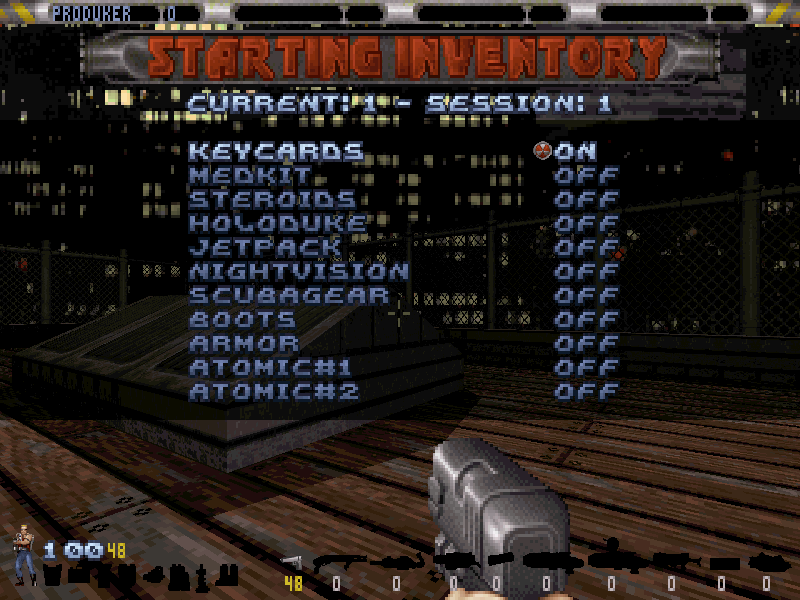
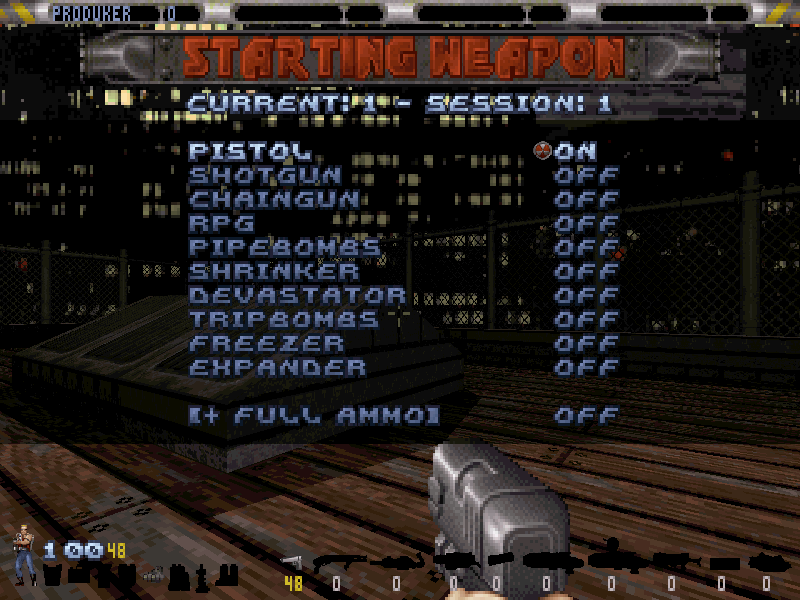
Starting Weapons #
You can make players always spawn with certain weapons by enabling the flags at the menu
Netplay Options > Starting Weapon. The number shown above the menu is a bitfield representing the selected weapons, go to command line arguments to learn more. You can use the args builder to generate the argument.
Starting Inventory #
You can make players always spawn with inventory items by enabling the flags at the menu
Netplay Options > Starting Inventory. The number shown above the menu is a bitfield representing the selected inventory items, go to command line arguments to learn more. You can use the args builder to generate the argument.